2026, Marzo | Article by: Michele Merelli
Particleworks v8.2 New Release
CFD software updates usually bring a mix of minor UI tweaks and one big feature you might never actually use in production. Particleworks v8.2 is different. It’s a heavy-hitting release focused strictly on what engineers have been asking for: better multiphase coupling, stable pressure solvers, and tools to make massive simulations physically manageable.
If you are running complex fluid-structure interactions, splashing gearboxes, or e-motor cooling scenarios, here is a no-nonsense look at the new capabilities under the hood, pulled directly from the v8.2 feature log.
1. Fluids: EIMPS Method Kills Pressure Oscillations
Let's talk about the MPS (Moving Particle Semi-implicit) solver. Explicit solvers are brilliant for sheer calculation speed, but they often suffer from annoying pressure oscillations and require you to artificially tweak the speed of sound just to keep the simulation stable.
Version 8.2 introduces the EIMPS (Explicit-Incompressible MPS) method.
- It inherently suppresses pressure oscillations during calculations, providing much cleaner data outputs.
- Unlike older pressure explicit solvers, you no longer need to set the speed of sound.
This translates to more reliable data when analyzing high-speed rotors or pumps. Additionally, you can now calculate Heat Transfer Coefficients (HTC) via the Nusselt number directly on insulated (adiabatic) walls, giving you more flexibility in thermal setups without needing complex workarounds.
2. The Air Game: Massive FVM & LBM Enhancements
Aerodynamics and multiphase flows received a massive, practical upgrade in this release.On the FVM (Finite Volume Method) side:
- You can now run single-precision execution to speed up iterative solver convergence (available when AMG is disabled).
- The new "Partial Lattice Generation" is a lifesaver for RAM. It lets you generate FVM cells only where necessary by specifying a shape file, drastically cutting down memory consumption on large domains.
- FVM now supports direct heat transfer coupling with CHT (Conjugate Heat Transfer) cells, which is perfect for modeling solid cooling driven by ambient airflow.
- You can now set specific drag adjustment parameters for different material properties in FVM-MPS coupling, which is critical when dealing with different coarse-graining scales.
Video:
3. Thermal & Powders: Anisotropy and Deposition
Heat conduction isn't always isotropic. CHT internal heat conduction simulations in 8.2 now support anisotropic thermal conductivity.
- You can set thermal conductivity individually for each spatial direction.
- This is exactly what you need when modeling the laminated structures of motor stator cores, where heat moves differently radially versus axially.
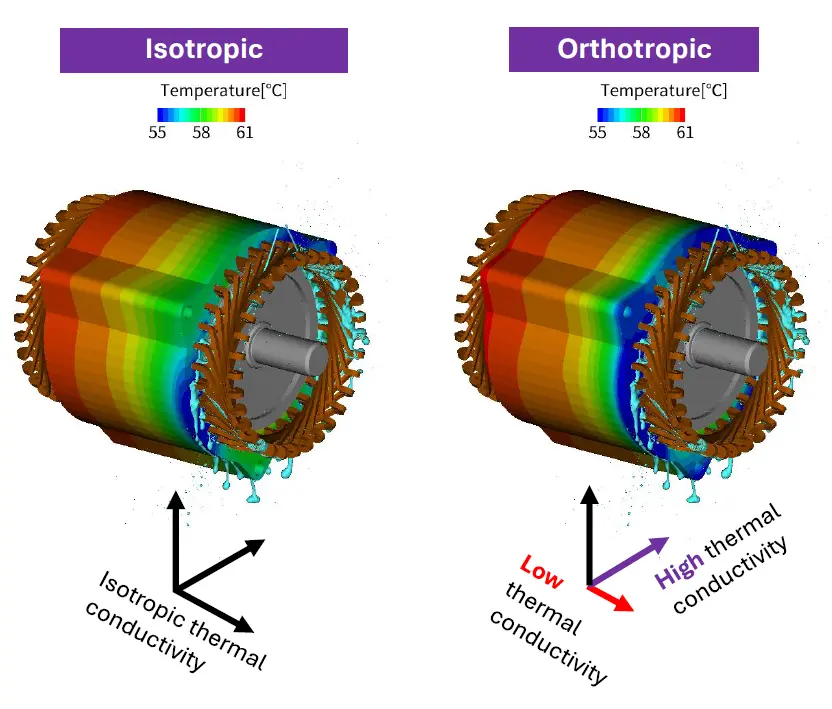
For DEM (Discrete Element Method), there’s a new Deposition model.
- You can simulate the physical behavior of powders or snow adhering to walls under air resistance.
- Coupled with LBM, it can even predict flow channel blockages caused by that material buildup over time.
- A new mass/volumetric flowrate boundary condition has also been added for DEM.
4. Post-Processing That Doesn’t Eat Your Time (Or Storage)
We spend half our lives in post-processing. v8.2 brings serious quality-of-life improvements so you aren't fighting the GUI:
- Streamlines: Generate visual streamlines directly for FVM mesh and LBM airflow fields.
- Force Mapping: Map normal and tangential fluid resistance forces directly onto your polygon structures.
- CSV Probes:Flow-rate measurements now output net flow (forward minus backward), and you can customize output intervals on the fly.
- Net Flowrate: Generate visual streamlines directly for FVM mesh and LBM airflow fields.
- File Size Control:Both LBM and DEM allow you to define specific output regions or skip writing heavy restart data, keeping result files from eating your entire hard drive. Plus, you can instantly copy and paste multiple nodes across different project scenes.
Particleworks blog
Enjoy our latest blog articles!
We will go over some of the simulation practices from the mesh-less solver and from the intuitive interface, that make the simulation process simple and fast.




Glossary
Take a look at the glossary dedicated to the terms of Moving Particle Simulation.